
How to Download Instagram Reels Videos?
Download Instagram Reels in Full HD quality with our free downloader. No software installation required.
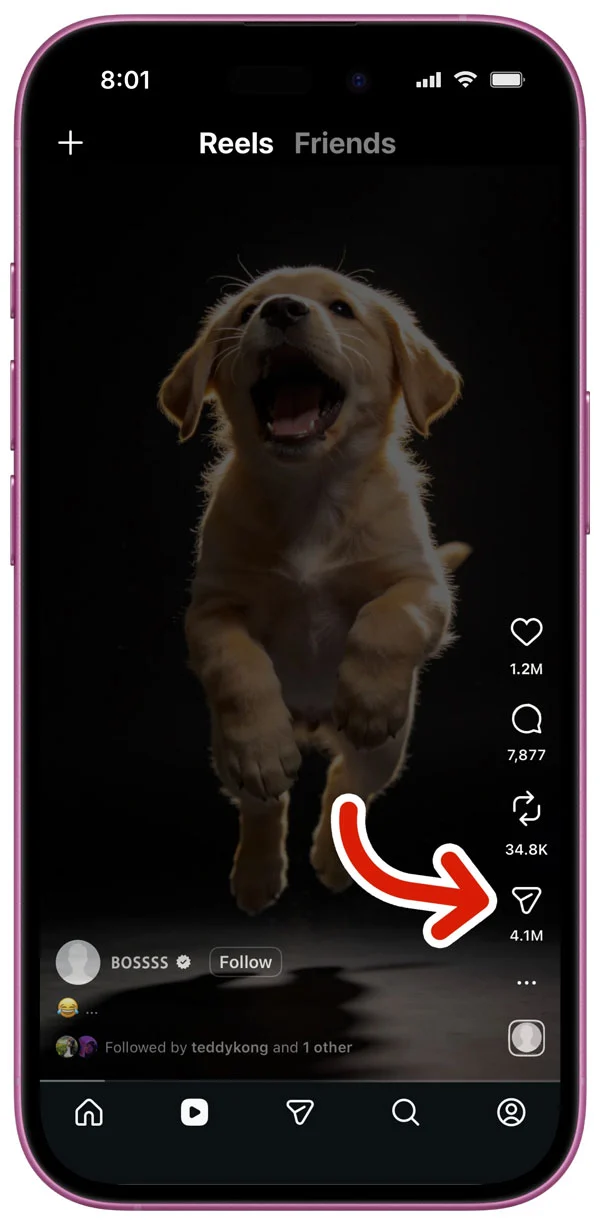
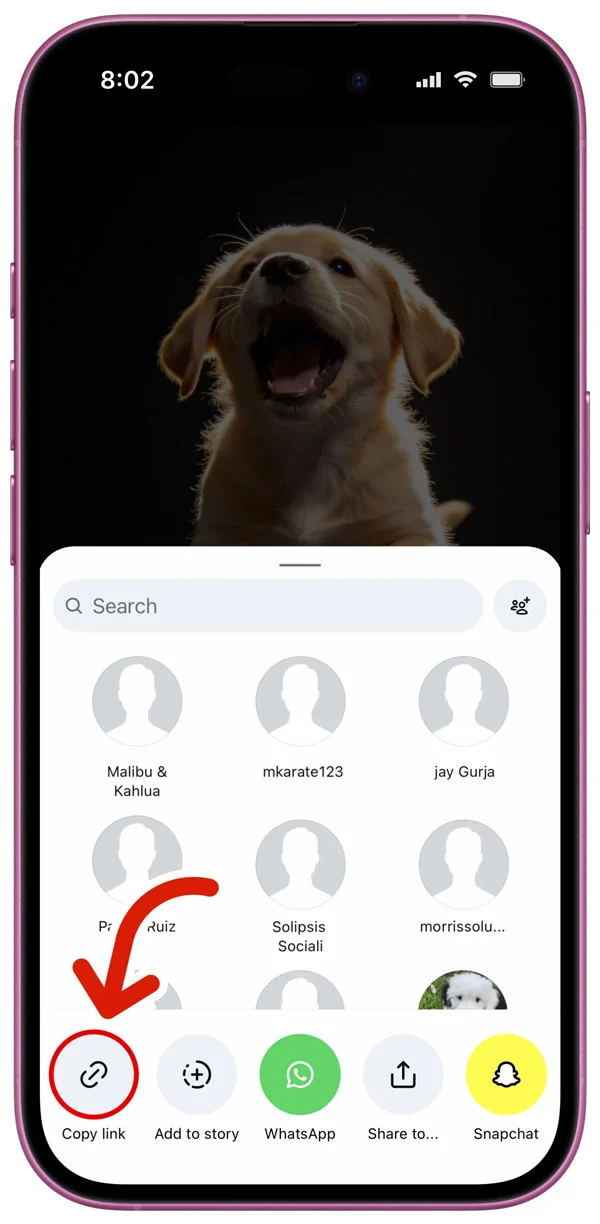
Copy Instagram Reels Link
Open Instagram Reels app, find the video you want, tap Share and copy the link
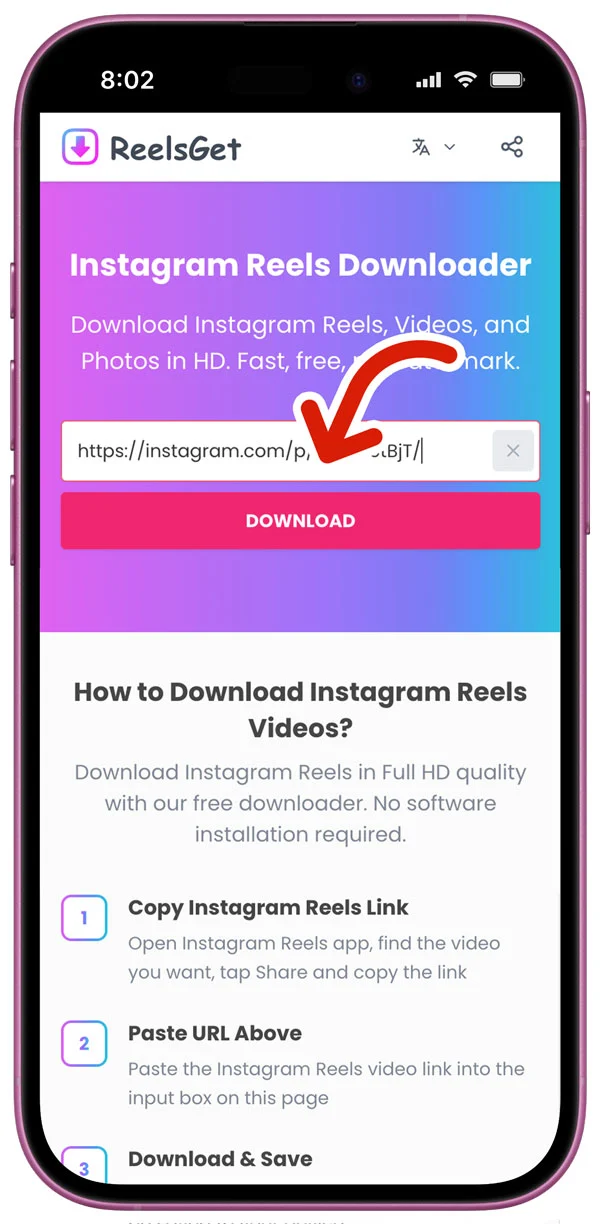
Paste URL Above
Paste the Instagram Reels video link into the input box on this page
Download & Save
Click the download button and the video will be saved to your device
Why Choose ReelsGet Instagram Downloader
The best free Instagram Reels downloader. Here's why users trust our tool.
HD Instagram Reels Downloads
Download Instagram Reels in the highest quality available — Full HD 1080p. Get the original video without any compression or quality loss.
No Watermark on Videos
Download Instagram Reels without any watermarks or logos. Our downloader fetches the original file directly, giving you clean videos.
Download Reels, Videos & Photos
Not just Reels — also download Instagram video posts and photos. One tool for all your Instagram download needs.
Works on All Devices
Use our Instagram downloader on iPhone, Android, PC, Mac, or tablet. Works in any browser — no app installation needed.
100% Free Downloads
Our Instagram Reels downloader is completely free with unlimited downloads. No registration, no hidden fees — just paste and download.
Fast & Private Downloads
Download Instagram Reels in seconds with optimized servers. We don't store any videos or personal data. Your downloads are completely private.
Fresh posts from our blog
How to Download Instagram Reels on iPhone
A complete guide to saving Instagram Reels videos on your iPhone. Quick, easy, and no app required.
Instagram Reels vs TikTok: Key Differences
Compare Instagram Reels and TikTok features, audience, and content strategy for creators.
Best Instagram Reels Downloaders in 2026
We tested the top Instagram Reels download tools. Here are our picks for speed, quality, and ease of use.
What Users Say About Our Reels Downloader
Join thousands who use ReelsGet to download Instagram Reels daily
Jessica Williams
Content Creator
“This is the best Instagram Reels downloader I've found. I've tried many tools but ReelsGet is the only one that consistently downloads HD videos without issues. Perfect for saving tutorials.”
David Chen
Social Media Manager
“As a social media manager, I need a reliable Instagram downloader. ReelsGet is a game changer — I can download Reels in seconds without any hassle. Highly recommend!”
Maria Santos
Digital Marketer
“Finally an Instagram Reels downloader that works on my phone! The video quality is excellent and there are no watermarks. I use it daily to save content for inspiration.”
Best Instagram Reels Downloader – Fast, Simple, and Free
Can't save your favorite Instagram Reels videos? Not anymore! With ReelsGet Instagram Reels Downloader, you can download Instagram Reels videos in just a few seconds. It's fast, free, and super easy to use.
Save any Instagram Reels you love – trending videos, funny clips, or creative content – straight to your phone or computer. All files keep their original quality with no watermark, so you get HD, 1080p, 2K, or even 4K downloads with no blur or loss of detail.
No apps. No sign-ups. No hidden steps. Just open your browser, paste the Instagram Reels link, and hit Download.
ReelsGet works everywhere – on PC, iPhone, Android, macOS, Windows, and Linux. Enjoy your favorite Instagram Reelss anytime, anywhere – simple, clean, and 100% free!
Frequently Asked Questions
Common questions about downloading Instagram content
Important Notice
ReelsGet is a free tool designed for personal use only. All content on Instagram belongs to the original creators. Please respect copyright laws and only download content for personal, educational, or reference purposes. Do not use downloaded content for commercial purposes or redistribute without permission. We do not store any videos or images on our servers. Learn more about our DMCA Policy and Copyright Notice.